Free Shipping*
Lower 48. Orders over $100.
2 Year Warranty
On all our radios.

Your cart is currently empty.


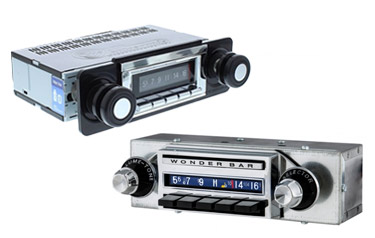
This Custom Autosound Slidebar Classic Car Radio features a bar that actuates the classic screen to make it display or disappear. It functions just like the bar did on original radios to change from AM to FM, but instead, it controls which face displays. The Slidebar radio features a digital tuner with 300 watts of power (45 W x 4 RMS or constant), built-in Bluetooth, a USB port, a CD changer controller (CD Changer sold separately). In addition to the features just listed, the Slidebar radio is the only in-dash radio that Custom Autosound offers that has a subwoofer pre-out and multi-color display so that you can change the color of the display to match your digital gauges or simply to the color you prefer. The Slidebar radio fits in your stock dash location without any modifications required. Simply put, this is the best radio that Custom Autosound has produced.
Stay connected on the road with the Slidebar Radio, built for your 1957 Chevy. A built-in microphone lets you take calls hands-free, keeping you safe and street-legal while you drive. This radio also features built-in Bluetooth, so you can wirelessly stream your favorite audio right through your classic vehicle's speakers, whether that's Spotify, Pandora, Apple Music, podcasts, or Sirius XM for subscribers.
The Slidebar Radio for your 1957 Chevy features an AM/FM stereo with 25 presets (15 FM and 10 AM), a USB port for flash drives, a CD changer controller, and an RCA auxiliary input. The USB port on the back of the unit lets you play songs from a thumb drive and charge your devices, though it doesn't support direct audio playback from connected devices.
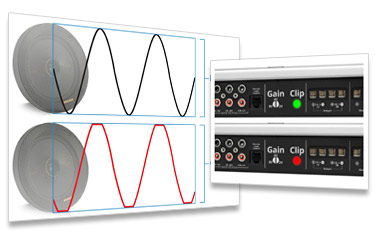
With 300 watts of peak power across 4 channels, the Slidebar Radio matches the output of the top of the line Custom Autosound models. For the best sound quality without adding an amplifier, this radio delivers. And if you're after truly amazing sound, pairing it with an amplifier takes things even further.
Still enjoy listening to CDs? Add the CD-1 external CD player, which plugs directly into the back of the Slidebar Radio. This compact 1/2 DIN device measures 7" x 1" x 7" and comes with a 10-foot cable for flexible placement. Mount it under a seat, in the glove box, under the dash, in the trunk, in a custom console, or anywhere else it fits within your vehicle's interior.
Looking to add an amplifier? The Slidebar Radio for your 1957 Chevy comes ready with 4 channel pre-outs for your speakers, plus a dedicated subwoofer pre-out and onboard subwoofer control. For a 4 channel amplifier setup, you can simply leave the subwoofer pre-out unused. Going with a 5 channel amplifier instead? Connect the subwoofer RCA cable to the pre-out on the back of the radio, and you'll be able to adjust subwoofer level right from the radio itself. A bass knob is still our top recommendation for quick, easy control, but the built-in subwoofer control is a solid option if you'd rather skip it.
The Slidebar Radio's display color is fully customizable to complement your vehicle's exterior, interior, or existing interior lighting. Beyond the multi-color display, you can also fine-tune the LCD brightness on a scale of 0-7. Since everyone has a different comfort level when driving at night, this feature lets you dial in the perfect brightness for your eyes.
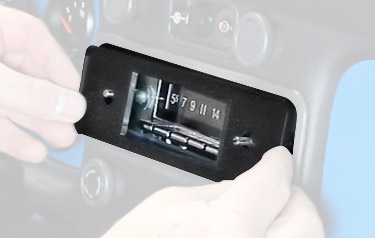
The Slidebar Radio fits neatly into your vehicle's original dash location, so you get Bluetooth without cutting into your dash or compromising the classic, original look of your 1957 Chevy.
Installation is simple with the Slidebar Radio, since it arrives ready to install right out of the box. There's no need to assemble anything yourself: the shafts are already set to fit your stock dash opening, and the nose piece is pre-attached. Skip the hassle of setting knob spacing, adjusting knob height, test fitting, or risking dash scratches during assembly.
Since the radio comes pre-assembled, you'll spend less time on installation and more time back on the road enjoying your classic truck. And if you're having a professional handle the install, that's one less hour, sometimes two, of labor you'll need to pay for.
Working on classic cars is part of the fun, but when it comes to installation, we'd rather you spend that time driving.
We stand behind the products we sell and so does Custom Autosound. All Slidebar radios come backed by a 2 year warranty.
I am one who takes a LONG time researching, analyzing, and exploring options before setting down money on an investment. The videos, advice, and support are terrific. You made shopping easy. Thank you! - Enrique V
Switched from a different vendor a couple projects ago. The support is great, product is amazing, good prices and fast shipping. What else does anyone want? - Andy

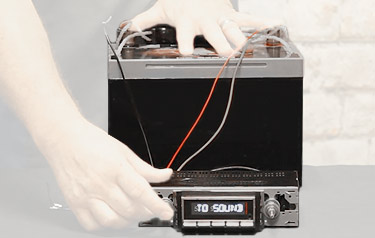
Head unit installation reference - power, ground, antenna, speaker, and amplifier connections. Based on Figure 2 wiring diagram.
Connect the antenna cable to the ANT SOCKET input on the back-left of the unit.
This unit also includes the following connections shown in the diagram:
On the top of the unit, three pairs of RCA jacks are labeled left to right: AUX IN, REAR, and FRONT (Line Out).
Connect RCA cables from the REAR and FRONT outputs to your amplifier's corresponding inputs (L = left channel, R = right channel on each pair). Use AUX IN only if feeding an auxiliary audio source into the unit.
| Wire | Color |
|---|---|
| Ignition/ACC +12V | Red |
| Ground | Black |
| Constant +12V | Yellow |
| Auto Antenna | Blue |
| Remote/Amp Turn-On Lead | Blue / White |
Note: the yellow and red wires must both be connected to +12V for the radio to operate.
| Speaker | Terminal | Wire Color |
|---|---|---|
| Left Front | + | White |
| Left Front | - | White / Black |
| Right Front | + | Gray |
| Right Front | - | Gray / Black |
| Left Rear | + | Green |
| Left Rear | - | Green / Black |
| Right Rear | + | Purple |
| Right Rear | - | Purple / Black |
Disconnect the vehicle battery before making any wiring connections, and verify wire colors against the actual harness before connecting.
All Custom Autosound Radios are backed by a 2 year warranty from the manufacturer. All radios are tested before being boxed and sent to ensure that they are working properly. In addition, we at Classic Car Stereos will work with you to fix any issue as quickly and as seemlessly as possible. We strive for 100% customer satisfaction.


Copyright © 2026 ClassicCarStereos.com
 5-Star Rating!
 Warning: Cancer and Reproductive Harm -